I don’t know if this is what you’re referring to, but I swapped the fiber optic cable for a 90-degree angled version, which gives me more room under the lens. And I modified the mount.
Bras articulé pour laser.zip (15.7 KB)
I don’t know if this is what you’re referring to, but I swapped the fiber optic cable for a 90-degree angled version, which gives me more room under the lens. And I modified the mount.
Bras articulé pour laser.zip (15.7 KB)
I am currently adjusting the laser switch and am having trouble with the height. I need to tweak the height of the arm components. I have acquired an angled laser with a focusing lens, but adjustments are required. Could you upload the “Bras articulé pour laser” and “Porte laser” files in STEP format so I can make some modifications? In general, having all the files in STEP format would be useful for making minor changes.
There’s nothing to change; it works perfectly just as designed. You really ought to start by building it as instructed and then make changes, don’t you think? It’s crazy how convinced people are that they can inevitably do better than the next guy.
Improving, modifying, having fun—that’s all fine by me—but start by replicating what works. If it doesn’t work, ask yourself what you might have done wrong first, before you start having doubts… … Roland, calm down. 
Bras articulé pour laser.zip (962.0 KB)
I am copying it exactly, but for some reason—whether due to your changes, my own errors, slight variations in secondary components like screws etc, or imprecise printing—I need to make some minor adjustments to the spacing. Don’t worry about it.
I’m doing the same thing, making minor modifications. Just to know, what software are you using to make modifications to the step files?
FreeCad or Autodesk fusion
Roland and eldi,
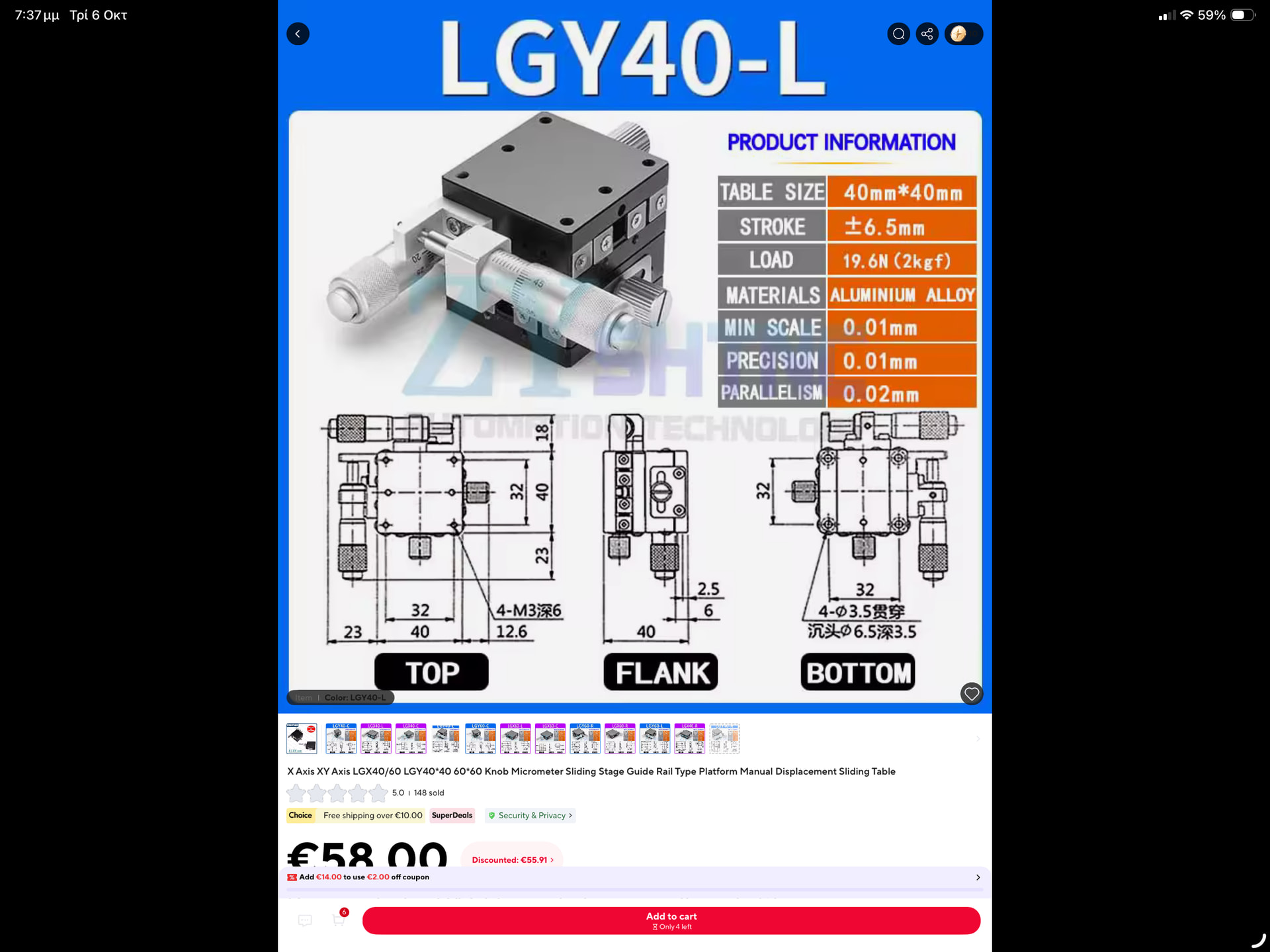
I’m trying to pick a 40 x 40 mm X-Y sliding table to adjust the laser position. Do you have any recommendation or should I just pick any on Aliexpress?
I completely agree with your philosophy and have total respect to the original design of your machine. However my assembly now has less than 10% of original models you’ve shared as I’m inspired by my own path. Also some of them were modified in blender to increase hole diameters or similar just to fit my existing screws etc.
talking about RGB LEDs I’m facing interesting discoveries btw. You need ALOT of light for continuous motion (obviously). Surprisingly the blue ones. I was investing heavily in deep red as their lux output is the lowest, but in comparison blue light gets absorbed by orange mask so hard that I’m forced to decrease reds to properly balance the rest of the channels. The good news - there is zero crosstalk and Basler software makes it easy to fine tune the light for every density and every mask in seconds. Now my transport gives me ability to expose like ARRISCAN / LG Director with separate channel exposures, but at very slow speeds. There was a mention somewhere that Blackmagic uses 576 LEDs array in their machine, and now I guess I know why they did that  mine has only 32. It’s clearly not enough. I’m already into new light design which also has IR lights for scratch mask. Some guys on GitHub reverse engineered Nikon’s ICE pipeline and ingested some fancy AI features to it, so maybe I’ll be lucky enough to onboard this model into realtime processing of the final image.
Do you have a link to the GitHub repository?
Nope, I’m following their progress but never tested. Would drop a link here shortly.
Hello @Roland !
What’s your general recommandation regarding the camera ?
I understand it must have a global shutter to work with continuous drive. What cable do you use to handle such a flow of data ? Do you need a specific “frame grabber card” between the camera and the computer ?
Finally, do you think the continuous drive could work with a monochrome sensor and RGB leds flashing 3 times per frame ?
Thanks a lot !
In my view, a global shutter is essential for a scanner that captures film continuously. To me, continuous capture is the only way to achieve a reasonable scanning speed. If you’re going to the trouble of building a scanner like this, you’ll want to scan at least a few films, so throughput matters. That’s my view, though, and not everyone shares it.
For the camera-to-computer connection, USB works perfectly well. Ethernet is another option I’m currently considering, particularly 5 or 10 GbE, which could potentially offer higher transfer rates, although I haven’t tested it myself yet. I believe Andrii uses an Ethernet connection. No special graphics card is needed for capture.
Could you tell us more about your project using a monochrome sensor and LEDs that flash three times per frame? Is the idea to combine the three exposures into a color image?
Thanks !
I currently use a modified projector and a DSLR camera, and white leds to digitize my super 8 films, it takes about 2h for a 3min30 super 8 film…
I’m thinking about building a new one from scratch, for 8mm and 16mm, I only shoot negative (color and b&w). RGB leds (instead of white leds) seem to be a good way to improve color negative quality
I never scan films longer than 3min30 so scanning at about 5fps would still be acceptable (and a huge improvment)
My intuition is also that monochrome sensor would be less expensive
Indeed my idea would be to combine the 3 exposures into one color image, but can it work if the film keeps moving between flashes ?
Flashes must be super powerful and fast
Two observations (one previously in this post):
A monochrome camera would not have the limitations of the bayer sensor pointed in the observation above, but it is increasingly difficult to make continuous motion with monochrome narrow band LEDs. Even if fast, each capture would be at a different position and require processing to overlay.
When using a color sensor, and three narrow band, consider that the limitations of the bayer filters would play a role.
What specific wavelength were you considering for the red LED?
Thanks
The message you linked is above my level of understanding of color science i guess 
I understand that for the best result with a color sensor I’ll need one with a red bayer filter for 690nm, and the Basler one here at 600nm is way off. So this color sensor wouldn’t be a good pick for kodak vision 3 films.
I was aiming for royal blue 440nm and deep red 660nm (I don’t know if red 690nm is easy to find)
But i’m still exploring / discussing ideas, aligning the 3 captures is a challenge, but it seems worth it ?
I am working on a low power setup for motionless capture that includes 730nm (Far Red). After is complete, I need to get some good shots in negative stock, as most of what I have is reversal.
I am using the HQ (with the IR filter removed) and that sensor at 730nm shows about ~0.6 relative response, which is attenuated, but would be usable.
If you have an HQ with the IR filter removed, and have your projector-scanner, I can share the software to capture each color-channel at different exposure. For negative, it may not be as good separation as narrow-band LEDs, but one can balance out the negative orange.
If you move the film slow enough, additional overscan may be required to provide the spacing for the 3 captures while the film is in the active area. The additional overscan translates into smaller effective resolution… so higher resolution sensors to compensate. Then the captures would require alignment.
I just don’t have the budget, so have taken the path of keeping the film motionless for capture. But it is an interesting challenge.
Never thought about this - even if capturing just a monochrome image, the film will move during the flash’s exposure time. So there should be some smearing in the vertical direction of a capture with these type of scanners. Has anybody some numbers (flash times used, speed of film movements in those scanners) to get a coarse estimate of the motion-blur induced by continious scanning operations?
Even in my stop-motion scanner, I do see tiny film movements - in this case caused by floor vibrations of my not very rigid scanner. So camera and film gate move microscopically between each other if someone moves across the room…
Thanks to ChatGPT (although I had already done this calculation before AI came along). In my opinion, scanner stability is ABSOLUTELY CRUCIAL. I also wonder whether movement of the light source could cause image shifts that need to be taken into account. :
The film moves vertically, so motion blur must be assessed using the image height and its vertical pixel count.
For the image itself, excluding perforations and film margins, manufacturer references give these dimensions:
| Format | Width | Height |
|---|---|---|
| Super 8, regular gate | 5.79 mm | 4.01 mm |
| Standard 16 mm | 10.26 mm | 7.49 mm |
At 16 frames per second, with a 100-microsecond exposure (In practice, between 30 and 150 microseconds) and continuous, steady film transport, using 240 frames per metre for Super 8 and 132 frames per metre for 16 mm:
| Film | Film speed | Displacement during exposure, in "–tenths of a millimetre–" |
|---|---|---|
| Super 8 | 66.67 mm/s | 0.0667 |
| 16 mm | 121.21 mm/s | 0.1212 |
This corresponds to approximately 0.166% of the Super 8 image height and 0.162% of the 16 mm image height.
To express this movement in pixels:
Vertical motion blur = film displacement / physical image height × image height in pixels.
The displacement and image height must use the same units.
An exact pixel calculation therefore requires the actual vertical pixel count of the image after cropping out the borders. The labels 2K and 4K alone do not specify that height.